
User guide





SYSTEM CONTROL WINDOWS
XEROX DOCUPRINT 180 LPS PC UI REFERENCE 8-39
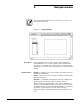
Stale Date
The Stale Date window is displayed when there is a stale date fault
on an Audit Logged job. The stale date conditions are set up through
the BTEXT commands in the job stream. Please refer to the
Xerox
DocuPrint 180 LPS PDL/DJDE Reference
manual for more details on
BTEXT commands.
Figure 8-34. Stale Date error window
One of three selections needs to be made when this window
appears.
• Ignore the error - This will Ignore the error on this report only
and a CONTINUE command will be sent to the printer.
• Ignore the error for the rest of the job - This will Ignore the error
on this report and all other reports in this job and a CONTINUE
command will be sent to the printer.
• Abort the job - This will abort the job that contains this report.
All other reports in this job that have not been printed yet will be
aborted.
The system is locked up until a selection is made and the Apply/
Close header button is selected.