
User guide



SYSTEM CONTROL WINDOWS
8-28 XEROX DOCUPRINT 180 LPS PC UI REFERENCE
Audit Log Display Options
Selecting options in this window determines the type and content of
the display.
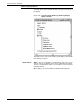
Figure 8-24. System Control>Audit Log>Audit Log Display
Options window
This window is the same as the Audit Log Print Options window with
the following exceptions.
Header button Apply: - There is no Apply/Close header button. This is done so the
user can perform a redisplay on the same log with different settings.
The Close header button must be selected when you have finished
using this window.
When Apply is selected the Audit Log Display window appears.