
User guide






SYSTEM CONTROL WINDOWS
XEROX DOCUPRINT 180 LPS PC UI REFERENCE 8-15
Print...
Print...: Select this button to specify saved or current console log
print options. The system must be idle to begin printing of the
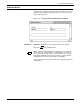
console log. The following Print Console Log window opens.
Figure 8-14. System Control >Console Log> Print Console Log
window
Use this window to specify the starting date, duration, and type of
information included in the print console log. A confirmation window
displays asking you to confirm or cancel the console log print
request.
The console log is printed using the currently selected language.