
User guide






SYSTEM CONTROL WINDOWS
8-10 XEROX DOCUPRINT 180 LPS PC UI REFERENCE
Console Log
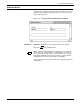
Use this window to display, save, print, empty, back up, and convert
the current console log. You can also use this window to display,
delete, back up, or print a saved console log from the PC UI hard disk
or PC UI floppy.
Figure 8-11. System Control>Console Log window
The console log allows you to review system information that can
help you determine the reason and any actions to take when the
DocuPrint 180 LPS appears to have a problem. The following items
are contained in the console log:
• All commands sent to the system controller
• All messages received from the system controller
• PC UI internal messages
• Dialog messages
• Debug information.
For step-by-step descriptions on performing specific Console Log
tasks, refer to the “System Control Tasks” section of the
DocuPrint
180 LPS Operator Guide
.