
User guide






SYSTEM CONTROL WINDOWS
XEROX DOCUPRINT 180 LPS PC UI REFERENCE 8-7
Enabled. Select this button to enable the audible alarm.
Disabled. Select this button to disable the audible alarm.
Flashing Light:
Enabled. Select this button to enable the Flashing Attention light
located on top of the printer.
Disabled. Select this button to disable the Flashing Attention light
located on top of the printer.
Energy Saver
Select the Energy Saver option from the System Control menu to
enable or disable Energy Saver mode, and to set the Time Out
Period.
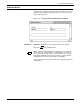
Figure 8-8. System Control>Energy Saver window
Parameters Disabled: Select the Disabled button to turn off Energy Saver mode.
Enabled
: Select the Enabled button to turn on Energy Saver mode.
Time out period (minutes): If the Enabled button is selected, the
Time Out Period appears. The Time Out Period lets you specify how
many minutes of printer inactivity should elapse before Energy Saver
mode begins.
Enter the number of minutes. The smallest number that can be
entered is 10, the largest is 65,535. 240 minutes (4 hours) is the
factory-set default.
Note: A message displays on the PC UI indicating that the IOT is
in Energy Saver mode.
Energy Saver mode is begun only if there are no Print Tasks active.
The timer is reset if a task is activated before the Time Out Period has
elapsed.
Both the Attention light and the audible alarm are not operational
when the printer is in Energy Saver mode.