
User guide





SYSTEM CONTROL WINDOWS
8-6 XEROX DOCUPRINT 180 LPS PC UI REFERENCE
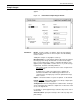
System Version
Use the System Version window to display the system version
number, the disk ID, the PC UI version number, and the current logon
level. This window is for display only; no changes can be made from
this window.
Figure 8-6. System Control>System Version window
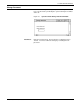
Attention Light/Alarm
Use the Attention Light/Alarm window to enable or disable the
attention light and/or alarm.
Figure 8-7. System Control>Attention Light/Alarm window
The Attention light can be enabled or disabled for either or both
modes—steady and flashing. If, for example, you disable the steady
mode of the Attention light, but leave the flashing mode enabled, the
Attention light does not go on when a condition such as low toner
occurs, but the Attention light still flashes when the printer stops.
Parameters Steady Light:
Enabled. Select this button to enable the Steady Attention light
located on top of the printer.
Disabled. Select this button to disable the Steady Attention light
located on top of the printer.
Alarm: