
User guide





SYSTEM CONTROL WINDOWS
XEROX DOCUPRINT 180 LPS PC UI REFERENCE 8-5
Restrict PC Features
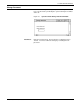
Select the Restrict PC Features option from the System Control
menu to restrict features by log level.
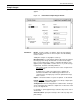
Figure 8-5. System Control>Restrict PC Features
Parameters Current Class Level: This field automatically displays features
available at the current log level. You can select the feature to be
restricted from this list, or enter it in the Command field.
Command: Enter the feature to be restricted here, or select it from
the Current Class Level listing.
Class Level: Enter the lowest log level at which the specified feature
can be accessed. You cannot enter a log level higher than the
current log level.
Note: Applied restriction levels are maintained across a power
down of the PC UI.
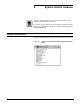
Console Log
Exit to DOS
Notepad
PC Editor
PC File Transfer
Restrict PC Features
Audit Log
Audit Log Administration