
User guide





SYSTEM CONTROL WINDOWS
8-4 XEROX DOCUPRINT 180 LPS PC UI REFERENCE
Restrict Command Usage (RCU)
Use this window to restrict the usage of commands and tasks to a
particular logon level.
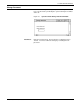
Figure 8-4. System Control>Restrict Command Usage window
Parameters Current Class Level: Commands and tasks that can be accessed
from the current log level are listed in this field. Select the command
or task for which you want to restrict usage.
Command: Enter the feature to be restricted here, or select it from
the Current Class Level listing.
Class Level: Enter the lowest log level at which the specified feature
can be accessed. You cannot enter a log level higher than the
current log level.
Note: Some commands cannot be restricted (for example,
ABORT).
In order to use a command, you must be logged on to a class level
greater than or equal to the specified class level for the command.
Therefore, you can restrict only a command that you are authorized
to use.