
User guide





SYSTEM CONTROL WINDOWS
XEROX DOCUPRINT 180 LPS PC UI REFERENCE 8-3
Change Password
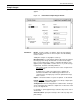
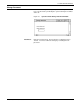
This window allows you to change the password for a specified class
level. Passwords are provided by the system and may be modified
at the site.
Figure 8-3. System Control>Change Password window
Parameters Enter the new password. The password is not displayed as it is
entered. You must confirm the change by reentering the new
password.