
User guide





SYSTEM CONTROL WINDOWS
8-2 XEROX DOCUPRINT 180 LPS PC UI REFERENCE
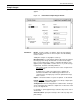
Change Logon Class Level
Use this window to access a different logon level by entering the
appropriate password. Restricted features and functions are
determined at your site by the Restrict Command Usage (RCU) task
(refer to description below). When changing logon class levels, any
open windows are cleared from the desktop.
Figure 8-2. System Control>Change Logon Class Level
Features at a lower logon level are always available. When going
from a higher logon level to a lower logon level, it is not necessary to
enter a password, except when logging down from level 5 to level 4
or 3.
Parameters Enter the log level you want to access and the password for that
logon level. The password is not displayed as it is being entered.
Asterisks are displayed to represent the characters as they are
entered. Entering the correct password gives you access to the new
logon level’s features.