
User guide





JOB CONTROL WINDOWS
7-10 XEROX DOCUPRINT 180 LPS PC UI REFERENCE
Vertical Units: Inches, centimeters, dots. Select the units of
measurement for the vertical position.
Horizontal Position: Specify the horizontal position of the top edge
of the printed image.
Horizontal Units: Inches, centimeters, dots. Select the units of
measurement for the horizontal position.
Orientation: Portrait or landscape. Select the orientation of the
graphic image.
Fonts/Forms/Graphics
In order to improve printer throughput, you can use this window to
define the maximum number of fonts, forms, and graphics that the
system stores in memory during a print job.
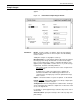
Figure 7-10. Job Control> Fonts/Forms/Graphics window
Parameters Fonts: Enter the maximum number of active fonts per print job. No
single printed page can have more fonts than this number. This
number must include all fonts used on the form, as well as variable
data.
If the number of fonts specified is exceeded during a print job, the job
aborts and a message is displayed.
Forms: Enter the maximum number of active forms per print job.
Specifying a number larger than one allows form changes on a page-
to-page basis without negative effects on printing speed, as long as
there is room for all the forms in system memory.
Graphics: Enter the maximum number of active graphics per print
job. No single printed page may call for more than 128 graphics.
This number must also include all graphics used on a form for the
page, if a form is used.
Note: The above values remain in effect until you change them, or
until a new operating system is generated.