
User guide





JOB CONTROL WINDOWS
XEROX DOCUPRINT 180 LPS PC UI REFERENCE 7-9
Sample Images
The Sample Images window allows you to print a hardcopy of a
graphic.
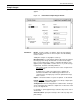
Figure 7-9. Job Control>Sample Images window
Parameters File ID: To print a sample of a graphic, either enter the graphic’s
image file name in the field, or select an option from the auxiliary
menu as follows:
*.IMG prints samples of all graphics at 300 spi
Descriptor Page: For each graphic sampled, two pages are printed:
the first page is the image itself and the second is the descriptor
page. The descriptor page contains a statistical description of the
graphic (name, height, width, resolution, and so on.), its file storage
requirements, and LPS command parameters.
Abbreviated
. Prints a shortened version of the comprehensive
descriptor page.
Comprehensive. Prints a descriptor page containing all
information available in the .IMG file type header block. A
comprehensive descriptor page cannot be printed if the image
file is secured.
Copies: 1. Enter the number of copies to be printed. 1 is the default.
Format: Simplex
. Select either simplex (one-sided) or duplex (two-
sided) printing. The default is simplex.
Scaling Factor: Enter an enlargement or reduction value. An image
can be enlarged by up to 8 times its original size or reduced as small
as 1/8 of its original size.
For example, to print a graphic image reduced to 25 percent, enter 1/
4 in the field.
Vertical Position: Specify the vertical position of the top edge of the
printed image.