
User guide






JOB CONTROL WINDOWS
7-8 XEROX DOCUPRINT 180 LPS PC UI REFERENCE
Sample Fonts/Forms/Logos
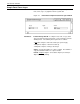
Use the Sample Fonts/Forms/Logos window to print samples of
fonts, forms, logos, or graphics from the system disk.
Figure 7-8. Job Control>Sample Fonts/Forms/Logos window
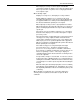
Parameters Font/Form/Logo File ID: To sample a font, form, or logo, either
enter a specific file name in this field, or select a file type from the
auxiliary menu. The auxiliary menu options are as follows:
*.FNT
prints samples of all fonts at 300 spots per inch (spi).
*.FRM prints samples of all forms at 300 spi.
*.LGO prints samples of all logos at 300 spi.
Copies: 1. Enter the number of copies you want. The default is 1
copy; the maximum number of copies is 32,767.
Format: Simplex
, Duplex. Select either simplex (one-sided) or
duplex (two-sided) printing.