
User guide






JOB CONTROL WINDOWS
XEROX DOCUPRINT 180 LPS PC UI REFERENCE 7-7
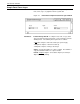
Figure 7-7. Job Control>Lead Edge Screen window
Use this screen to select the lead edge lightening value you want.
The current edge lightening is indicated by the highlighted button.
Parameters Normal: Select this button to apply a normal lead edge screen.
Stress: Select this button to apply a heavier lead edge screen.
Off
: Select the Off button to turn the lead edge screen off.
Note: The edge lightening change is applied on the next cycle up.
The Lead Edge Screen (edge lightening) alleviates potential fuser roll
wrap problems. The possibility of jams increases when the feature is
deactivated.
Application of this feature may cause image degradation in the area
where the screen is applied.
Selecting the Stress option impacts the copy quality of the lead edge
solid area more than the Normal setting because it applies a higher
screen frequency to the area.
The Lead Edge Screen feature applies across jobs.