
User guide






JOB CONTROL WINDOWS
7-4 XEROX DOCUPRINT 180 LPS PC UI REFERENCE
Reset
The Reset task will perform amny fuctions.
Using the Reset task results in the following:
• Removal of all print jobs from the job queue. Any pages in the
printer paper path are sent to the selected stacker bin.
• All processing activity stops, including accounting.
• If your LPS is online, all jobs in the system need to be resent
from the host.
Therefore, the Reset task should not be used if the Abort task can be
used instead. Refer to figure 7-2 for information on the Abort window.
• If the system is idle when the Reset task is selected, the
messages OS0990 RESETTING THE SYSTEM and OS1000
READY FOR COMMANDS appear informing you that the
system has been reset and is ready for another request.
• If the system is not idle, the following messages appear in the
message window:
RESET WILL CLEAR JOB QUEUE. DO YOU WANT TO
PROCEED?
(TYPE ’Y’ FOR YES OR ’N’ FOR NO; ENTER=YES)
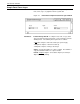
Figure 7-3. Job Control>Reset confirmation window
Header buttons Yes: Selecting this header button clears the job queue and closes
the Reset window.
No: Selecting this header button closes the Reset window without
clearing the job queue.
Note: The Reset task should not be used if the Abort task can be
used instead.