
User guide






PRINT TASKS WINDOWS
XEROX DOCUPRINT 180 LPS PC UI REFERENCE 6-35
SDI Insert
Use this window to define which LPS system controller file to transfer
to the shared disk.
Figure 6-27. Print Tasks>SDI>SDI Insert window
Parameters File ID: - Enter the LPS system controller filename you want
transferred to the shared disk.
Start Command Index: - Enter the start command index (sci) as
defined in the Xerox Dynamic Document Interface Operator
Guide.
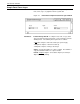
SDI Change
Use this window to specify the shared disk job to copy from the
shared disk to the LPS system disk.
Figure 6-28. Print Tasks>SDI>SDI Change window
Parameters JID #: - Enter the SDI job number you want copied to the system
controller.
File ID: - This is a one to six character string identifying the filename
that will be given to the SDI job to be copied to the system controller.
No file type is necessary. TMP is automatically assigned as the file
type.