
User guide





PRINT TASKS WINDOWS
6-32 XEROX DOCUPRINT 180 LPS PC UI REFERENCE
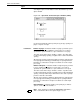
SDI Job Status
Selecting the SDI Jobs Status header button from the SDI window
opens the SDI Jobs Status window.
Figure 6-25. Print Tasks>SDI>SDI Job Status window
Use the SDI Jobs Status window to display a specified list of jobs in
SDI’s internal queue.
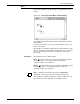
Header Buttons Jobs - Select this header button to display jobs with status specified
in the SDI JOBS FILTER command or through the SDI Job Option
window.
All - Select this header button to display the status of all jobs.
Job ID: - Select this header button to display the status of the first job
listed in the JID #: section of this window.
Job Range: - Select this header button to display the status of jobs
specified by the contents of the JID Range: section of this window.
Set Filter . . . - Select this header button to set the options of the SDI
Job Options window. This specifies which job status values are
enabled for job display by any subsequent SDI JOBS (no options
specified) command.