
User guide





PRINT TASKS WINDOWS
XEROX DOCUPRINT 180 LPS PC UI REFERENCE 6-29
Move
Use the Move window to position a tape to a specific block or file
location.
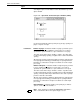
Figure 6-23. Print Tasks>Start>Move window (Offline)
Selecting the Move header button from the Start window opens the
Move window.
If a block or file number is not specified, the default is to move one
block or file forward.
After the Move command is applied, input is stopped and a message
appears informing you that the tape is being positioned. If a job is in
process, you must then select/press Continue to resume input
processing.
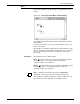
Parameters Select either the Files or Blocks button.
Files: 1
Enter the number of files forward or backward you want to
position the tape to. The range that can be specified is
-32768 to +32768. The default is 1.
Blocks: 1
Enter the number of blocks forward or backward you want
to position the tape to. The range that can be specified is
-32768 to +32768. The default is 1.
Note: The Move task cannot be performed if ABNORMAL
SECURITY = YES is part of the Job Descriptor Library (JDL).
Once the Move command is initiated, you may not switch from one
tape device to the other without first resetting the system.