
User guide





PRINT TASKS WINDOWS
XEROX DOCUPRINT 180 LPS PC UI REFERENCE 6-27
Page spacing is only available after an offline report has begun
printing. Printing must be stopped before you can space over pages
of a report.
Backward page spacing is not allowed for single copy jobs.
When spacing reports, you may only space the same tape device
specified in the START command.
Report spacing may be initiated any time after a job has been started,
provided:
Input is stopped or the system is suspended.
The reports option of the START command is not invoked.
A tape cannot be positioned before the start-of-job position or after
the end-of-volume position.
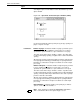
The system may require you to execute the SPACE command due to
conditions encountered in the job. A message window such as the
one in figure 6-21 notifies you of the condition and displays
instructions.
Figure 6-21. Print Tasks>Start>Space message window