
User guide


PRINT TASKS WINDOWS
6-22 XEROX DOCUPRINT 180 LPS PC UI REFERENCE
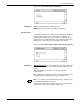
Start
The Start window displays all of the start parameters and system
defaults for offline and online printing.
Figure 6-19. Print Tasks>Start Window
Header buttons Start/Close: Select this header button to start the print job and close
the Start window.
Start: Select this header button to start the print job.
Close: Select this header button to close the Start window.
Save: Select this header button to save a start command name to
the Saved Command list. Refer to the Saved Command description
below.
Delete: Select this header button to delete a command name from
the Saved Command list.
Show: Entering the name of a saved command in the Saved
Command input field and selecting the Show header button displays
the parameters of that start command.
Rewind: (Offline parameter) Select this header button to rewind a
tape to the beginning of tape (BOT) mark, as an alternative to
rewinding the tape from the tape drive unit. Rewind can also be
requested before all reports on the tape are done printing. In this
case, rewinding begins at the end of the job.
Messages inform you when the tape has begun rewinding or
rewinding/unloading, and when the task is complete.
Once rewind has begun, you cannot switch from one tape device to
another without first resetting the system.
Unload: (Offline parameters) Selecting this header button rewinds
the tape and unloads it from the take-up reel, clearing the tape path.
Drain: Use the Drain header button to print all formatted pages in the
print file or in memory without ending the print job in progress. You