
User guide


PRINT TASKS WINDOWS
XEROX DOCUPRINT 180 LPS PC UI REFERENCE 6-21
another destination is not available. A message is displayed warning
that a partial set or job has been delivered to the bin.
Bin Full Criteria can also be specified in terms of the maximum
number of sheets. Refer to the following section, “Bin Limits.”
Bin Limits
The Bin Limits window is available by selecting the Bin Limits option
from the Bin Full Criteria header auxiliary menu.
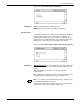
Use this window to set bin limits according to the maximum number
of stacked sheets per bin (100-2500 sheets).
Figure 6-18. Print Tasks>Printer Status>Bin Full Criteria> Bin
Limits window
Note: Bin Options C and D will appear only if the printer is
configured with them.
Parameters Maximum number of sheets (100-2500) for Bin A, Bin B, Bin C,
Bin D: Enter the maximum number of sheets for the stacker bin(s).
Note: Bin limits can also be specified in terms of the maximum
number of reams. Refer to the previous section, “Bin Full Criteria.”