
User guide


PRINT TASKS WINDOWS
XEROX DOCUPRINT 180 LPS PC UI REFERENCE 6-19
Container Type 5 is now set to 216,356
Container Type 6 is now set to 432,279
Container Type 1 is now set to 257,364
Tray Size
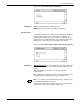
The Tray Size window is available by selecting the Tray Size header
button from the Printer Status window.
Figure 6-16. Print Tasks>Printer Status>Tray Size window
Use this window to set a feeder tray for custom size paper. Values
are stored in the printer’s nonvolatile memory (NVM) and are retained
while the system is off.
Parameters Tray 1
, 2, 3, 4, 5, 6, 7. Select the tray containing custom size paper.
Add/Replace: Enter the paper dimensions (in inches or millimeters).
Note: The printer must be idle to perform this task.
This task can also be performed from the printer control console.
Trays 5, 6, and 7 are only available if the system is configured with
them.