
User guide


PRINT TASKS WINDOWS
6-16 XEROX DOCUPRINT 180 LPS PC UI REFERENCE
Ordered stock
Ordered stock consists of paper arranged in a specific order in a
feeder tray so that it can be printed in a cycle. Pre-numbered sheets
and tabs are two examples of ordered stock.
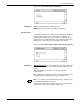
Figure 6-13. Print Tasks>Printer Status>Ordered Stock window
The Ordered Stock window allows you to reset the logical paper
stock counter in the feeder tray.
Selecting the Ordered Stock option from the Printer Status window
header auxiliary menu opens the Ordered Stock window.
Parameters Tray number: Select/enter the number of the tray containing the
ordered stock. Select 7 if ordered stock is being fed from a third-party
feeding device.
Position: Enter the ordered stock position. For example, to tell the
LPS that page number 6 is ready to be printed from ordered stock in
tray number 3, enter 3 in the Tray Number field and 6 in the Position
field. The position can be a value up to 254.