
User guide




PRINT TASKS WINDOWS
6-4 XEROX DOCUPRINT 180 LPS PC UI REFERENCE
Printer Status
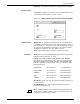
Use this window to display a mimic of the printer which shows the
current status of feeder trays and stacker bins, as well as the current
report cluster name(s). If your printer is configured with a bypass
transport and third-party feeding and finishing devices, their status is
also displayed in this window.
Figure 6-3. Print Tasks>Printer Status window (printer mimic)
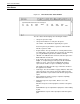
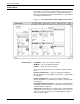
Header buttons Feed Mode...- Opens the Feed Mode window.
Bin Mode... - Opens the Bin Mode window.
Clusters... - Opens the Clusters window.
The following header buttons are accessible through the Auxilliary
button.
Finishing Configuration... - Opens the Finishing Configuration
window. This button is only available if your printer is configured with
the equipment.
Feeding Configuration... - Opens the Feeding Configuration
window. This button is only available if your printer is configured with
the equipment.
Feeding/Finishing Configuration... - Opens the Feeding/ Finishing
Configuration window. This button is only available if your printer is
configured with the equipment.
Separate Off - SEPARATE processing is disabled. The SEPARATE
command remains in effect for the duration of the current report. At
end of report, the bin change occurs, and SEPARATE is disabled
until you request it again.