
User guide




PRINT TASKS WINDOWS
6-2 XEROX DOCUPRINT 180 LPS PC UI REFERENCE
Jobs Status
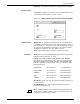
Use this window to view jobs in the print queue.
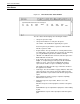
Figure 6-2. Print Tasks>Jobs Status window
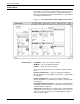
The Jobs Status window displays the following information:
• Job/report queued for input
• Job/report information for each job in the queue:
Job number: Job identification supplied by the system
Customer job Host job number, if system is online number:
File ID, if system is offline
• Report number: The report number as currently defined on the
accounting page. Report name: The report name as defined by
you or by the DISC keyword in the START command.
• JDE/JDL: The JDE/JDL name entered to start the report or the
DJDE JDE/JDL encountered.
• Copy Count: If the report is currently in Input, queued for
Output, or completed, Copy Count represents the maximum
number of copies. If the report is in Output, this number
represents the number of copies remaining to be printed.
This number may differ from the copy count in the JSL due to
the application of a DJDE.
• Total Pages: The current number of pages written to disk, if the
report is in Input. If the report is queued for Output or being
printed, this number represents the total number of pages in the
report.
• Page Printed: The number of pages completed, if printing.
Otherwise this value is zero.
• Status Message: The report status, which is one of the
following:
INPUT if the report is in the Input phase and has not begun to
print
QUEUED if the report completed the Input phase and is waiting
to print
IN/PRNTG if the report is in the Input phase and has begun to
print