
User guide




UTILITIES WINDOW
5-26 XEROX DOCUPRINT 180 LPS PC UI REFERENCE
Exit to DOS
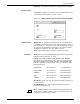
Use the Exit to DOS window to put the PC in the DOS mode of
operation to run DOS applications or to safely power off the PC UI.
This utility puts the UI in a safe state to prevent any loss of records
from the Console Log. If a record is being written to the console log,
the PC UI completes writing that record to the log and stops all
activities, including communication with the ESS, before exiting to
DOS.
Figure 5-17. Utilities>Exit to DOS window
When the PC UI is in DOS mode, you can turn the PC UI power off.
To logon, turn the power switch off and on, press the boot/reset
button on the PC, or press <CTRL><ALT><DEL>.
Header buttons Yes: Selecting this option exits you from object mode (windows) to
DOS mode.
No: Selecting this option returns you to object mode (windows).
Note: DOS applications cannot be run while the PC UI is in object
mode or TEM. You must exit to DOS to run DOS applications.
To return to object mode windows from DOS mode, enter manuai at
the DOS prompt.
Exit to DOS is unavailable when the system is performing critical
functions like file transfers and Audit logging.