
User guide
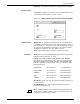


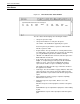


UTILITIES WINDOW
XEROX DOCUPRINT 180 LPS PC UI REFERENCE 5-25
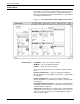
Parameters Image File Name: This is where you enter the name or names of the
file or files that you wish to display fix or print using the IMD utility.
Filenames may contain wild cards such as “*“ matching 0 or more
characters or “?“ matching exactly one character. Length should be
at least one and at most six characters. The only valid filetype is
.IMG.
Example: TEST.IMG
Operation: You would select the desired button to display (Dump),
print, or fix the desired .IMG files.
This selects either the IMAGE DUMP, IMAGE PRINT, or IMAGE FIX
commands as could be entered in the Message window.
The Dump selection will cause the PC UI to switch to TEM display
where the data regarding the IMG or IM6 will be displayed.
Options: You select these check boxes to initiate the Verbose,
Statistics, and Expand options for the Dump or Print operations and
the All option for the Fix operation of the IMAGE command.
Verbose
causes detailed diagnostic messages to be displayed or
printed.
Statistics
causes a statistics summary to be displayed or printed.
Expand
displays or prints a compressed scanline followed by a
decompressed scanline. Without this selection, no decompression
will be performed on the compressed data.
All
fixes all image files and RES format.
Scanlines: - You specify in these boxes the range to dump or print
the image data.
For more information on the IMAGE command, refer to the
Xerox
DocuPrint 180 LPS Operations Reference
.
Image File List: You specify the type of images to display in the
window under the parameter which will be listed when the List button
in the header of the IMD utility window is selected.