
User guide




UTILITIES WINDOW
5-22 XEROX DOCUPRINT 180 LPS PC UI REFERENCE
Finishing Device Exerciser (FEX)
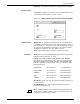
You can select the Finishing Device Exerciser (FEX) task from the
Utilities menu or from the Messages window. Use this window to set
up the parameters for generating a test case for the finishing device
configured with your system.
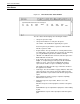
Figure 5-15. Utilities>Finishing Device Exerciser (FEX)
The FEX task will generate a test case as defined by the parameters
set in this window and will cause the printer to print the test job.
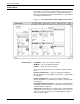
Header buttons Apply/Close: Selecting this header button performs the Finishing
Device Exerciser (FEX) task and closes the window.
Apply: Selecting this header button or pressing the enter key
performs the Finishing Device Exerciser (FEX) task.
Parameters Number of Sets - Enter the total number of sets you want to create.
Number of Pages per set - Enter the number of pages you want per
set.
Form Name - Enter the form (.FRM) name you want to use for the
test. You do not enter “.FRM“.
Print Duplex - If you want to print the set in duplex, select this check
box. If you want simplex do not select this check box.
Feeder Number: - Select the number for the feeder from the
selection menu or type the number of the feeder into the field.