
User guide




UTILITIES WINDOW
XEROX DOCUPRINT 180 LPS PC UI REFERENCE 5-21
Redisplay: Select this header button to update the file list display.
File Information
This dialog box displays if the system needs more information about
a file you have tried to transfer, convert, or copy.
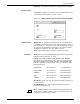
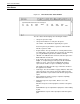
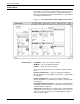
Figure 5-14. Utilities>PC File Transfer>File Information window
Header buttons Apply/Close: Select this header button or press the <ENTER> key
to submit the information to the system and continue the transfer or
conversion process. The system creates a file description for internal
use using the specified window parameters. Once this internal file
description is created, it is stored for future reference.
Close: This header button cancels the operation in progress.
Parameters File ID: The system automatically displays the name of the input file
being transferred, converted, or copied.
Format: ASCII (DOS), ASCII (UNIX), EBCDIC, ESS, BINARY.
Select/enter the format of the input file. When selecting the format
through the auxiliary menu, the Record Size and Line Numbering
fields are updated as specified below. These specifications can be
changed, if desired.
Record Size: 64, 80, 132, 512. Select/enter the number of bytes per
record for the file.
Line Numbering: 0, 8. Select/enter the number of bytes to be
reserved for line numbering.
Note: All EDI-editable files are classified as having an ESS format.
A text file that is in ESS format is a series of 80 character lines, with
8 characters reserved for line numbers.
ASCII (DOS) Record Size: 0 Line Numbering: 0
ASCII (UNIX) Record Size: 0 Line Numbering: 0
EBCDIC Record Size: 0 Line Numbering: 0
ESS Record Size: 80 Line Numbering: 8
BINARY Record Size: 0 Line Numbering: 0