
Quick Reference Guide


HEX150CS-KIT QUICK REFERENCE GUIDE
www.blustream.co.uk
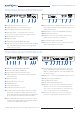
Understanding the Transmitter/Receiver status lights
03
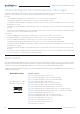
EDID (Extended Display Identification Data) is a data structure that is used between a display and a source. This data is used by
the source to find out what audio and video resolutions are supported by the display. By pre-determining the video resolution
and audio format of the source and display device you can reduce the time needed for EDID hand shaking.
Configuration of extender EDID settings can be achieved using the product dip-switches of the HEX150CS-TX. EDID dip-switch
settings are shown below:
EDID Control
Global EDID settings
Dip-switch position ‘0’ = O
Dip-switch position ‘1’ = On
The Blustream HEX150CS-KIT extender solutions include status LED indicators on both the Transmitter and Receiver
products to show all connections are active and to help diagnose possible problems.
Receiver:
• The HDMI signal link light will be o when there is no connection with a display/sink
• The HDMI link light will be on when there is an active connection with a display
• The HDBaseT™ RJ45 link light (orange) will be o when there is no CAT cable/active HDBaseT™ connection on the
RJ45 HDBaseT™ input
• The HDBaseT™ RJ45 link light (orange) will blink if there is an unstable connection between the Transmitter and
Receiver
• The HDBaseT™ RJ45 link light (green) will blink when a CAT cable is connected to the HDBaseT™ RJ45 input and an
active connection is achieved with the Transmitter.
Transmitter:
• The Input HDMI signal link light will be o when there is no connection with a source device
• The Output HDMI-Loop signal link light will be o when there is no connection with a display/sink
• The Input HDMI link light will be on when there is an active connection with a source device
• The Output HDMI-Loop link light will be on when there is an active connection with a display/sink
• The HDBaseT™ RJ45 link light (orange) will be o when there is no CAT cable/active HDBaseT™ connection on the
RJ45 HDBaseT™ output
• The HDBaseT™ RJ45 link light (orange) will blink if there is an unstable connection between the Transmitter and
Receiver
• The HDBaseT™ RJ45 link light (green) will blink when a CAT cable is connected to the HDBaseT™ RJ45 output and
an active connection is achieved with the Receiver / Matrix.
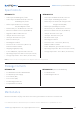
EDID Dip-switches
[DIP]=0000: HDMI 1080p@60Hz, Audio 2ch PCM
[DIP]=0001: HDMI 1080p@60Hz, Audio 5.1ch PCM/DTS/DOLBY
[DIP]=0010: HDMI 1080p@60Hz, Audio 7.1ch PCM/DTS/DOLBY/HD
[DIP]=0011: HDMI 1080i@60Hz, Audio 2ch PCM
[DIP]=0100: HDMI 1080i@60Hz, Audio 5.1ch PCM/DTS/DOLBY
[DIP]=0101: HDMI 1080i@60Hz, Audio 7.1ch PCM/DTS/DOLBY/HD
[DIP]=0110: HDMI 4K@60Hz 4:2:0 / 4K@30Hz 4:4:4, Audio 2ch PCM
[DIP]=0111: HDMI 4K@60Hz 4:2:0 / 4K@30Hz 4:4:4, Audio 5.1ch PCM/DTS/DOLBY
[DIP]=1000: HDMI 4K@60Hz 4:2:0 / 4K@30Hz 4:4:4, Audio 7.1ch PCM/DTS/DOLBY/HD
[DIP]=1001: HDMI 4K@60Hz 4:4:4, Audio 2ch PCM
[DIP]=1010: HDMI 4K@60Hz 4:4:4, Audio 5.1ch PCM/DTS/DOLBY
[DIP]=1011: HDMI 4K@60Hz 4:4:4, Audio 7.1ch PCM/DTS/DOLBY/HD
[DIP]=1100: DVI 1280x1024@60Hz, Audio None
[DIP]=1101: DVI 1920x1080@60Hz, Audio None
[DIP]=1110: DVI 1920x1200@60Hz, Audio None
[DIP]=1111: EDID pass-through
HDMI In HDMI Out
Link
Link
RS-232
IR INIR OUT
EDID
IR
12V5V
Upgrade
HDBT Out DC 12V
Power