
Programming instructions

OPERATION & CALIBRATION
2-7
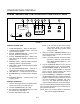
CONTROL OPERATION
To turn the oven on:
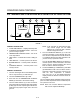
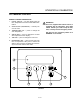
1. Press and hold the ON/OFF key (2). The display
reads OFF when the oven is idle.
2. The display flashes WAIT D LOW D SET D TIME.
3. The FAN and HEAT status lamps (9) light. The
fans begin to run. The heat rises to the proĆ
grammed temperature. The conveyor belt travĆ
els at the programmed speed.
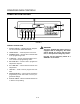
To view the cook time setting:
1. Press the TIME key (7). The LED on the key lights
and the display flashes SET D TIME.
To display the actual oven temperature:
1. Press the ACT TEMP key (6). The LED on the key
lights and the display reads ACTUAL D _F.
To view the temperature set point:
1. Press the SET TEMP key (5). The LED on the key
lights and the display flashes SET D TEMP D _F.
To turn the oven off:
1. Press the ON/OFF key (2). The blower motor(s)
continue to run regardless of the controller status
until the temperature drops below 180_F (82_C).
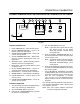
PROGRAMMING PROCEDURES
Programming the Cook Time:
1. Press the PROGRAM/ENTER key (8).
2. Press the TIME key (7). The display reads
PROGĆ? D SET D TIMEĆ? D _ _ _ _.
3. Use the NUMERIC keys (3) to enter the desired
cook time. The display will read the numbers as
they are entered. If an error is made, press the
CLEAR key (4) and reĆenter the number.
4. Press the PROGRAM/ENTER key (8) a second
time to lockĆin the new time. The new cook time
will be stored in the computer's memory.
Programming the Temperature:
1. Press the PROGRAM/ENTER key (8).
2. Press the SET TEMP key (5). The display reads
PROGĆ? D SET D TEMPĆ? D _ _ _ __F.
3. Use the NUMERIC keys (3) to enter the desired
temperature set point. The control displays the
numbers as they are entered. If an error is made,
press the CLEAR key (4) and reĆenter the numĆ
ber.
4. Press the PROGRAM/ENTER key (8) a second
time to lockĆin the new temperature. The new
temperature setpoint will be stored in the comĆ
puter's memory.
Operation at the Programmed Settings:
1. Press and hold the ON/OFF key (2).
2. The FAN and HEAT status lamps (9) light. The
fans begin to run. The heat rises to the temperaĆ
ture setting stored in the computer's memory.
The conveyor belt begins to travel at the timed
speed stored in memory.
3. The display will flash WAIT D LOW D SET D TIME unĆ
til the programmed bake temperature is
reached. The HEAT lamp (9) will remain lit until
the oven reaches the temperature set point.
4. The display reads READY and the HEAT lamp (9)
goes out.
5. The oven is now ready to accept product.
6. Press and hold the ON/OFF key (2) to turn the
oven off. The fans continue to run while the oven
cools to a safe temperature.