
Programming instructions
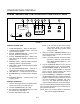
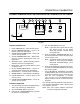

CONVEYOR OVEN CONTROLS
2-6
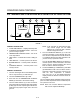
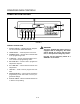
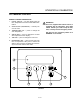
COMPUTER CONTROLLER
1
2
3
45678
9
FIGURE 5
CONTROL DESCRIPTION
1. DIGITAL DISPLAY - Displays the time, temperaĆ
ture and controller related information.
2. OVEN ON/OFF - Controls power to the oven.
3. NUMERIC KEYS - Used to enter numerical data
in the programming mode.
4. CLEAR KEY - Used to clear the display if an erĆ
ror is made in the programming mode.
5. SET TEMP KEY - Used to view or program the
temperature setpoint.
6. ACT TEMP KEY - Used to view the current oven
temperature.
7. TIME KEY - Used to view or program the cook
time.
8. PROG/ENTER KEY - Used to enter and exit the
programming mode. Also used to lock in proĆ
grammed settings.
9. STATUS LAMPS - When lit indicate that the fan
or burners are operating.
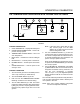
WARNING!!
This oven, supplied with remote control, is
equipped with an emergency shut down
switch. Should you need to stop the belt,
fans, or heat press the emergency switch.
DO NOT use the emergency switch as a
GENERAL on/off switch!