
Programming instructions

OPERATION & CALIBRATION
3-19
OPTIONAL MEAT PROBE
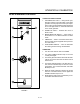
CONTROLS IDENTIFICATION
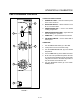
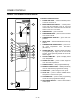
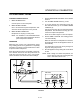
1. MEAT PROBE SWITCH
Controls power to the meat probe.
2. MEAT PROBE CONTROL
Use to set the desired probe temperature. IndiĆ
cates the actual temperature of the product
3. MEAT PROBE CONNECTOR
Receptacle for the plug in meat probe.
NOTE: For sanitation it is recommended that the
meat probe remain plugged into the front
panel receptacle at all times.
OPERATION
Measuring the product core temperatures during
long roasting periods is very practical. It is especially
important for products such as Roast Beef to reach
a specific internal temperture.
Place the probe through to the middle of the prodĆ
uct's thickest section. Be sure the probe does not
touch any bone and the tip is not in a fat pocket.
These conditions can cause inaccurate readings.
1. Set the MODE SELECTOR Switch to the desired
function.
2. Turn the MEAT PROBE Switch (1) to ON.
3. To set the desired core temperature press the
blue SET BUTTON (4) on the MEAT PROBE
CONTROL (2).
Use the up arrow key (6) to increase the setpoint
temperature. Use the down arrow key (5) to deĆ
crease the setpoint temperature.
Press the set button again to store the setpoint.
4. Set the TIMER to STAY ON. The cooking process
runs automatically.
When the selected core temperature is reached,
the buzzer will sound and the appliance shuts off
automatically.
The temperature and mode can by changed at
any time during the process.
5. Shut the appliance off by setting the mode switch
to OFF.
NOTE: When setting the internal temperature, be
sure to allow for carryĆover cooking after the
roast is removed from the oven.
1
2
RDY
WATLOW
SET
1
2
3
4 5 6
FIGURE 9