
Programming instructions

COMBI CONTROLS
3-16
CNVĆ14 OPTIONAL COOK & HOLD
1
2
3
4
7
5
6
8
9
10
11
12
13
14
15
16
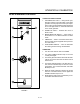
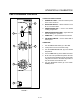
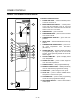
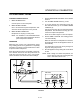
FIGURE 8
CONTROLS IDENTIFICATION
1. POWER ON LIGHT - when lit indicates power
to the unit is turned on.
2. MODE SELECTOR SWITCH - controls power
to the oven and selection of hot air and cool
down modes. The convection fan runs with the
switch in hot air or cool down.
3. TIME DISPLAY - gives cook time.
4. TIME ARROW KEYS - press to enter cook time
from 00:00 to 99:59.
5. TEMPERATURE DISPLAY - gives cook temĆ
perature.
6. HEAT LIGHT - when lit indicates hot air is in opĆ
eration.
7. TEMPERATURE ARROW KEYS - press to enĆ
ter cook temperature from 140-500_F
(60-260_C).
8. STAGE ONE LED - when lit indicates operation
or programming of stage one for the current
product. Cook cycles may contain one or two difĆ
ferent stages.
9. ACTUAL TEMP KEY - press to display actual
oven temperature
10. STAGE TWO KEY - press to enter stage two
cook time and temperature.
11. PRODUCT KEYS - three programmable keys.
12. MANUAL PRODUCT KEY - default product key
used for manual and programmed cooking.
13. START KEY - press to begin a cook cycle.
14. STOP KEY - press to silence audible alarms
and pause or cancel cook cycles.
15. PROGRAM KEY - press to enter programming
mode and save programmed settings.
16. FAN SPEED SWITCH - used to select LOW or
HIGH speed