
Programming instructions

OPERATION & CALIBRATION
3-15
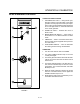
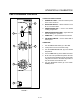
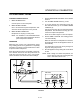
CNVĆ14 STANDARD CONTROLS
1
4
3
2
5
6
FIGURE 7
CONTROLS IDENTIFICATION
1. POWER ON LIGHT - when lit indicates power
to the unit is turned on.
2. SELECTOR SWITCH - allows selection of Hot
Air or Cool Down Mode.
3. TEMPERATURE DIAL - used to set desired
cooking temperature.
4. HEATING INDICATOR LIGHT - lights when the
Hot Air heating is in operation.
5. TIMER DIAL - used to set desired cook time.
6. FAN SPEED SWITCH - used to select LOW or
HIGH speed
OPERATION
1. Turn the SELECTOR switch (2) to HOT AIR.
2. Load product into the oven when ready.
3. Turn the TEMPERATURE DIAL (3) to the desired
temperature.
4. Turn the TIMER DIAL (5) to the desired cook time.
5. At the end of the specified time period, the buzzĆ
er sounds and the appliance shuts off automatiĆ
cally. Move the timer to the STAY ON position to
stop the buzzer and restart the unit.
6. Turn the SELECTOR switch (2) to the COOLĆ
DOWN position.