
Programming instructions

COMBI CONTROLS
3-14
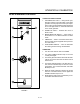
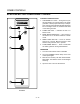
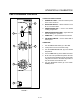
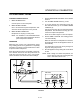
BCS6 PUSH BUTTON POWER SAVER" CONTROL
3
1
2
4
5
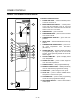
FIGURE 6
CONTROLS IDENTIFICATION
1. LOW WATER FILL LIGHT - during the fill cycle,
this light remains on until the water in the steam
generator is at the proper level and up to temperĆ
ature. During normal operation the light should not
be on. If the light comes on, check the water level
in the steam generator.
2. POWER ON LIGHT - Indicates the unit is in
Steam mode.
3. MODE SELECTOR SWITCH - Turns power to
the steamer on or off. Allows selection of steam
mode.
4. RESET PUSH BOTTON - Turns on steamer
when door is closed. Must be pushed to start
steamer every time the door is opened.
5. FLUSH/DRAIN SWITCH - Used to flush/drain
the steam generator during decalcification.
OPERATION
1. Turn the mode selector switch to STEAM.
2. The green POWER Indicator lamp on the front
control panel lights.
3. With the door closed, push and release the REĆ
SET button. The steamer comes one and begins
steaming.
4. Open the door to shut off the steamer.