
Programming instructions

OPERATION & CALIBRATION
3-13
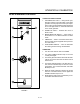
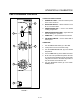
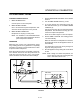
BCS6 STANDARD CONTROLS
3
1
2
4
5
FIGURE 5
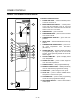
CONTROLS IDENTIFICATION
1. LOW WATER FILL LIGHT - during the fill cycle,
this light remains on until the water in the steam
generator is at the proper level and up to temperĆ
ature. During normal operation the light should not
be on. If the light comes on, check the water level
in the steam generator.
2. POWER ON LIGHT - Indicates the unit is in
Steam mode.
3. MODE SELECTOR SWITCH - Turns power to
the steamer on or off. Allows selection of steam
mode.
4. TIMER DIAL - Used to set desired steam time.
Some models may be supplied with a push butĆ
ton reset switch.
5. FLUSH/DRAIN SWITCH - Used to flush/drain
the steam generator during decalcification.
OPERATION
1. Turn the mode selector switch to STEAM.
2. The green POWER Indicator lamp on the front
control panel lights.
3. The steam generator flushes and drain automatiĆ
cally for 75 seconds if the unit has been off for at
least 5 hours.
4. The steam generator begins to fill. After two minĆ
utes, the FILL indicator lamp on the front control
panel blinks. The convection blower and POWĆ
ER lamp turn off.
5. When the steam generator is filled to the proper
level, the convection blower, interior lights and
POWER indicator lamp turn on.
6. Steam fills the cavity and is controlled by a nonĆ
accessible internal thermostat.