
Programming instructions

COMBI CONTROLS
3-12
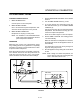
PROGRAMMING THE MANUAL KEY
NOTE: The manual key may be used for manual
cooking and programmed for two products,
one for steam and one for hot air/combi. Hot air
programs can be used in combi.
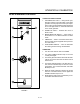
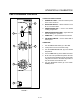
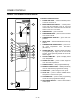
1. Turn the SELECTOR SWITCH (3) to the desired
mode.
2. Press the MANUAL KEY (13). The LED above the
manual key lights.
3. Press the TEMPERATURE ARROW KEYS (8) to
set the stage one cook temperature.
4. Press the TIME ARROW KEYS (5) to set the stage
one cook time.
5. Press the STAGE TWO KEY (11).
NOTE: Stage two can be used for either a hold
mode or a second cook temperature. ExĆ
ample: Cook meats or poultry at a low
temperature for maximum moisture
retention, then set the second stage for
browning. To use the second stage for
holding, you must set an appropriate
hold time for the unit to count down from.
NOTE: If stage two is not required enter a cook
time of 00:00.
6. Press the TEMPERATURE ARROW KEYS (8) to
set the stage two cook temperature.
7. Press the TIME ARROW KEYS (5) to set the stage
two cook time.
8. Press and hold the PROGRAM KEY (16) to save
the program settings.
NOTE: Time and temperature settings may be
changed at any time during operation of a
programmed manual key. Press the time arĆ
row keys to change the cook time. Press the
temperature arrow keys to change the cook
temperature.