
Programming instructions

OPERATION & CALIBRATION
3-11
STEAM ON DEMAND
Steam on Demand is helpful in many ways. The
steam injection allows a much faster, consistent,
even heat transfer. It also increases product moisture
and reduces shrinkage while cooking faster and
helps the oven temperature recover faster. Steam on
Demand allows for Combi Frying oven ready
breaded foods to perfection and crusty breads are a
breeze.
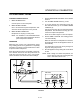
Steam can be introduced at any point during the
cooking process as follows:
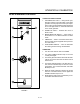
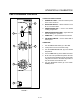
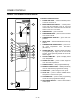
1. Use the STEAM INJECTION TIMER (17) to set
the desired steam time.
2. Press the STEAM ON DEMAND SWITCH (18).
The following example demonstrates how steam inĆ
jection can be used with breads to form a superior
crust:
1. Preheat oven to 350_F (177_C) in the Combi
mode.
2. Load product into the oven.
3. Set the fan to low speed.
4. Set the steam injection time for 5 minutes.
5. Set the TIME ARROW KEYS (5) for the desired toĆ
tal cooking time for the product.
6. Press the STEAM ON DEMAND SWITCH (18).
Here is an example of Combi Frying breaded foods:
1. Preheat oven to 375_F (191_C).
2. Load product into oven on wire racks or perfoĆ
rated pans.
3. Set TIME ARROW KEYS (5) for 10 minutes.
4. Set STEAM ON DEMAND (18) for 3 minutes.
5. Remove product from oven when time expires.
NOTE: More or less time may be added depending
portion size and oven loads.
PROGRAMMING THE PRODUCT KEYS
NOTE: Each product key can hold two programs: one
for steam and one for hot air/combi. Hot air
programs can be used in combi.
1. Turn the SELECTOR SWITCH (3) to the desired
mode.
2. Press the desired PRODUCT KEY (12).
3. Press and hold the PROGRAM KEY (16) for five
seconds. The control beeps. The product key
LED and STAGE ONE LED (9) light.
4. Press the TEMPERATURE ARROW KEYS (8) to
set the stage one cook temperature.
5. Press the TIME ARROW KEYS (5) to set the stage
one cook time.
6. Press the STAGE TWO KEY (11).
NOTE: Stage two can be used for either a hold
mode or a second cook temperature. ExĆ
ample: Cook meats or poultry at a low
temperature for maximum moisture
retention, then set the second stage for
browning. To use the second stage for
holding, you must set an appropriate
hold time for the unit to count down from.
NOTE: If stage two is not required enter a cook
time of 00:00.
7. Press the TEMPERATURE ARROW KEYS (8) to
set the stage two cook temperature.
8. Press the TIME ARROW KEYS (5) to set the stage
two cook time.
9. Press and hold the PROGRAM KEY (16) to save
the program settings.