
Programming instructions
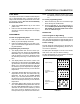

OPERATION & CALIBRATION
3-7
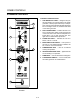
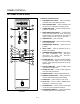
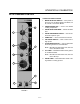
BC14 STANDARD CONTROL
1
4
3
2
6
7
5
8
9
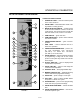
FIGURE 3
CONTROLS IDENTIFICATION
1. MODE SELECTOR SWITCH - turns power to
the oven on or off. Allows selection of Steam, Hot
Air, Combi or Cool Down Modes.
2. TEMPERATURE DIAL - used to set desired
cooking temperature.
3. STEAM INJECTION TIMER - used to set steam
time
4. STEAM ON DEMAND SWITCH - used to initiĆ
ate steam injection cycle
5. TIMER DIAL - used to set desired cook time.
6. FAN SPEED SWITCH - used to select low or
high speed.
7. FLUSH/DRAIN SWITCH - used to flush/drain
the steam generator for decalcification.
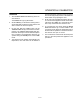
NOTE: BC14DS, the direct steam unit, does not
have a flush/drain switch
8. FILL LAMP - illuminated until the steam generaĆ
tor is filled with water
NOTE: BC14DS, the direct steam unit, does not
have a fill lamp.
9. STEAM LAMP - illuminated when steam is beĆ
ing added to cooking process