
Programming instructions

COMBI CONTROLS
3-4
OPTIONAL COOK & HOLD
1
4
2
3
13
5
15
14
16
17
6
9
12
7
8
10
11
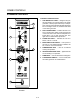
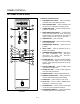
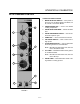
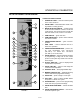
FIGURE 2
CONTROLS IDENTIFICATION
1. LOW WATER FILL LIGHT - when lit indicates
low water level in the steam generator.
2. DON'T STEAM LIGHT - when lit indicates the
unit is too hot to operate in the steam mode.
3. POWER ON LIGHT - when lit indicates power
to the unit is turned on.
4. MODE SELECTOR SWITCH - controls power
to the oven and selection of steam, hot air and
combi modes. The convection fan runs with the
switch in steam, hot air, combi or cool down.
5. TIME DISPLAY - gives cook time.
6. TIME ARROW KEYS - press to enter cook time
from 00:00 to 99:59.
7. TEMPERATURE DISPLAY - gives cook temĆ
perature.
8. HEAT LIGHT - when lit indicates hot air or
steam is in operation.
9. TEMPERATURE ARROW KEYS - press to enĆ
ter cook temperature from 120-212_F
(48-100_C) for steam and 140-500_F
(60-260_C) for hot air/combi.
10. STAGE ONE LED - when lit indicates operation
or programming of stage one for the current
product. Cook cycles may contain one or two difĆ
ferent stages.
11. ACTUAL TEMP KEY - press to display actual
oven/steamer temperature
12. STAGE TWO KEY - press to enter stage two
cook time and temperature.
13. PRODUCT KEYS - three programmable keys.
14. MANUAL PRODUCT KEY - default product key
used for manual and programmed cooking.
15. START KEY - press to begin a cook cycle.
16. STOP KEY - press to silence audible alarms
and pause or cancel cook cycles.
17. PROGRAM KEY - press to enter programming
mode and save programmed settings.
18. FLUSH/DRAIN SWITCH - Used to flush/drain
the steam generator for decalcification.