
Programming instructions
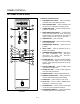

OPERATION & CALIBRATION
3-3
OPERATION
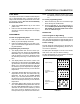
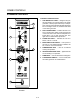
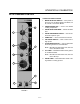
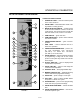
1. Turn the MODE SELECTOR Switch (4) to the deĆ
sired function.
The POWER ON Light (3) illuminates.
2. Set the TIMER (5) for the desired cooking time or
set it to STAY ON. The buzzer sounds and the unit
shuts off when the time has expired.
3. For the HOT AIR and COMBI modes, set the
TEMPERATURE Dial (2) to the desired cook temĆ
perature. The HEATING INDICATOR Light (6) ilĆ
luminates and stays lit until the desired temperaĆ
ture is reached. The temperature dial does not
operate during the STEAM portion of the COMBI
mode.
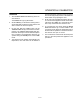
4. The selected mode operates automatically. The
temperature, time and mode can be altered at
any time during the cooking process. The operaĆ
tion can be stopped by the use of the Mode SeĆ
lector Switch or by opening the door.
5. At the end of the specified time period, the buzzĆ
er sounds and the appliance shuts off automatiĆ
cally. Move the TIMER (5) to the STAY ON posiĆ
tion to stop the buzzer and restart the unit.
6. To cool down the oven cavity, switch the MODE
SELECTOR Switch (4) to COOL DOWN. In the
Cool Down mode neither the temperature dial or
the timer will be operational. The blower will funcĆ
tion with the door open or closed.
7. The mode selector switch is also the main power
switch. In the OFF position the appliance is not
operational.