
Programming instructions
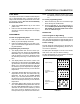
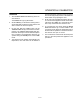
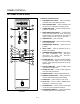
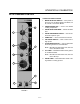

COMBI CONTROLS
3-2
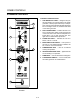
STANDARD CONTROLS
4
6
5
1
3
7
8
2
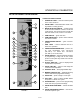
FIGURE 1
CONTROLS IDENTIFICATION
1. LOW WATER FILL LIGHT - during the fill cycle,
this light remains on until the water in the steam
generator is at the proper level and up to temperĆ
ature. During normal operation the light should not
be on. If the light comes on, check the water level
in the steam generator.
2. DON'T STEAM LIGHT - indicates the unit is too
hot to operate in the steam mode. Place the unit
in the Cool Down mode until the temperature is
below 230_F (110_C) and open the door. This
light does not inhibit steam production.
3. POWER ON LIGHT - indicates the unit is in
Steam, Hot Air or Combi.
4. MODE SELECTOR SWITCH - turns power to
the oven on or off. Allows selection of Steam, Hot
Air, Combi or Cool Down Modes.
5. TEMPERATURE DIAL - used to set desired
cooking temperature.
6. HEATING INDICATOR LIGHT - lights when the
Hot Air heating is in operation.
7. TIMER DIAL - used to set desired cooking time.
8. FLUSH/DRAIN SWITCH - used to flush/drain
the steam generator for decalcification.