
Programming instructions

OPERATION & CALIBRATION
2-9
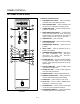
SLEEP MODE:
The sleep mode is used to maintain a deck temperaĆ
ture of approximately 200_ F overnight. Using the
sleep mode decreases the preheat time for the deck
the following morning. Be sure the mechanically
driven hood is left on.
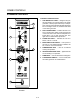
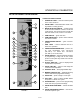
1. Toggle the STEAM SWITCH (2) on the control
panel to OFF.
2. Press and hold the SLEEP MODE KEY (3) for 2
seconds to enter the sleep mode. The display
reads rEST.
PROGRAMMING
To enter the programming mode:
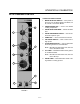
1. Push and hold both UP and DOWN ARROW
KEYS (10) until the display reads tInE.
2. Press the PRODUCT KEY (14) you want to proĆ
gram. The red indicator light above the selected
key will illuminate.
Programming the product keys:
1. The display flashes tInE and the current proĆ
grammed cook time. Use the UP and DOWN ARĆ
ROW KEYS (10) to increase/decrease the units
until the desired cook time is displayed. Press
the selected product key to enter the new cook
time.
2. The display flashes toP and the current cook
temperature for the top panel. The PANEL LIGHT
(3) illuminates. Use the UP and DOWN ARROW
KEYS (10) to increase/decrease the units until
the desired top cook temperature is displayed.
Press the selected product key to enter the new
temperature.
3. The display flashes dEcH and the current cook
temperature for the deck. The DECK LIGHT (9)
illuminates. Use the UP and DOWN ARROW
KEYS (10) to increase/decrease the units until
the desired top cook temperature is displayed.
Press the selected product key to enter the new
temperature.
4. The display flashes StEn and the current steam
time. The STEAM LIGHT (8) illuminates. Use the
UP and DOWN ARROW KEYS (10) to increase/
decrease the units until the desired top steam
time (from 0Ć3:59) is displayed. Press the seĆ
lected product key to enter the new steam time.
NOTE: To program additional product keys, press
the desired product key and repeat STEPS
1Ć4.
To exit the programming mode:
1. Select Product key #5. The red indicator light
above the key #5 will illuminate.
2. Push the TIME KEY (4). The display flashes Loc
and 0. DO NOT press the arrow keys. Doing so
will disable the program mode in the future.
Press the TIME KEY again.
BAKING TIPS
Current Program for Bagel Baking
Steam is applied for the first minute of the 17:30 bake
time. The deck temperature is approximately 430_F.
The panel bake temperature is approximately 490_F.
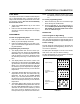
Product Loading:
Product should be evenly spaced on the deck. BaĆ
gels will double in size during baking. Be sure to alĆ
low room for expansion.
DO NOT place the bagels too close to the interior
walls of the oven. This can cause scorching.
DO NOT place bagels too close together. The bagels
expand and white spots may form.
Incorrect -
Bagels too close to
walls
Proper loading
Incorrect -
Bagels too close toĆ
gether
FIGURE 7