
Programming instructions

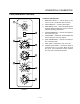
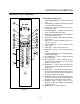

CONVECTION OVEN CONTROLS
1-4
OPERATION
Cook Only:
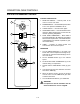
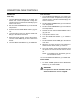
1. Turn the SELECTOR SWITCH (1) to COOK. The
blower and control compartment cooling fans
operate and are controlled automatically by the
action of the doors.
2. Set the COOK THERMOSTAT (4) to the desired
temperature.
3. Preheat until the OVEN READY LIGHT (3) goes
out.
4. Load product into the oven. Set the COOK TIMĆ
ER (5) to the desired cook time.
5. When the buzzer sounds, remove the product.
Turn the COOK TIMER (5) to OFF to silence the
buzzer.
6. Turn the SELECTOR SWITCH (1) to OVEN OFF.
Cook and Hold:
1. Turn the SELECTOR SWITCH (1) to COOK. The
blower and control compartment cooling fans
operate and are controlled automatically by the
action of the doors.
2. Set the COOK THERMOSTAT (4) to the desired
cook temperature.
3. Set the HOLD THERMOSTAT (6) to the desired
hold temperature.
4. Preheat the oven until the OVEN READY LIGHT
(3) goes out.
5. Load product into the oven.
6. Turn the SELECTOR Switch (1) to COOK &
HOLD.
7. Set the COOK & HOLD TIMER (8) to the desired
cook time.
8. When the cook time ends the oven switches to
HOLD and the HOLD LIGHT (7) comes on.
9. The oven remains at the hold temperature until
the product is removed and the oven is turned
off.
NOTE: In the HOLD cycle, the blower goes on
and off with the burner.
10. Turn the SELECTOR SWITCH (1) to OVEN OFF.
COOL DOWN
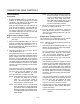
1. For COOL DOWN operation set the SELECTOR
SWITCH (1) to COOL DOWN.
WARNING!!
A complete five minute shutdown must be
observed before the oven is relighted.