
Programming instructions

OPERATION & CALIBRATION
2-7
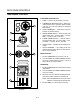
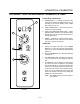
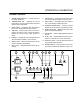
1048DD CONTROL
1. STEAM POWER SWITCH - Controls power to
the steam generator.
2. TEMPERATURE KEY - Displays the current
temperature. Used to toggle between the panel
and the deck temperature.
3. PANEL LIGHT - Illuminates when the temperaĆ
ture on the display indicates the top panel.
4. TIME KEY - Used in Cook mode to view the reĆ
maining cook time. If not in cook mode, push to
display the current mode, either preheat or
ready.
5. DISPLAY - Displays time and temperature and
other information related to oven function.
6. READY LIGHT - When lit indicates the oven has
reached operating temperature.
7. HEAT LIGHT - Indicates that the burners are opĆ
erating.
8. STEAM LIGHT - Indicates that the steam soleĆ
noid is open allowing steam to enter the unit.
9. DECK LIGHT - Illuminates when the temperaĆ
ture on the display indicates the deck.
10. UP/DOWN ARROW KEYS - Used to increase/
decrease units during the programming mode.
11. SLEEP MODE KEY - Maintains the oven at the
preset overnight temperature.
12. STEAM KEY - Used to toggle between steam on
and off.
13. PLUS 1 KEY - Adds additional cook time from 1
minute to 4 minutes in 1 minute increments.
14. PRODUCT KEYS - Used to select desired prodĆ
uct programming information.
15. POWER SWITCH Ć Controls power to the oven.
The switch will illuminate when the power is on.
1 2 4 6 7 85
15 14 13 12 11
103
9
FIGURE 6