
Programming instructions

DECK OVEN CONTROLS
2-4
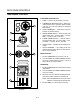
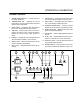
1400 SERIES - SOLID STATE TEMPERATURE CONTROL
1
2
3
4
5
6
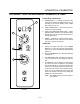
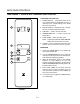
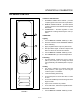
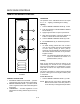
FIGURE 3
COMPONENT DESCRIPTION
1. POWER SWITCH - Controls the power to the
oven. When switched to OVEN ON, the oven is
operating in the normal heating mode. OVEN
OFF, turns the oven off.
2. DIGITAL DISPLAY - Displays the time, temperaĆ
ture and controller related information.
3. TIME DIAL - A dial to set the cook time.
4. TEMPERATURE DIAL - A dial to set the cook
temperature.
5. START TIMER - Starts the timing cycle.
NOTE: To display the ACTUAL OVEN TEMPERAĆ
TURE, press and hold for 3 seconds.
6. CANCEL - Press to cancel the end of time cycle
warning. Press to abort time cycle in progress.
OPERATION
1. Toggle the POWER SWITCH (1) to OVEN ON.
The cooling fan will start.
2. Turn the TEMPERATURE DIAL (3) to select the
desired preĆheat temperature. The selected preĆ
heat temperature will begin flashing.
3. When the temperature shown in the DIGITAL
DISPLAY (2) stops flashing, the oven has
reached operating temperature. Set the desired
TIME and TEMPERATURE manually with the apĆ
propriate dials (3 and 4).
4. Press START TIMER (5). The timer will count
down the set time. Upon completion of the set
time, the buzzer will sound. Press CANCEL (6)
and remove the product.
5. To shut the oven off, toggle the POWER SWITCH
(1) to OVEN OFF.