
Programming instructions
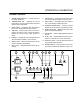

DECK OVEN CONTROLS
2-2
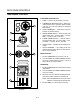
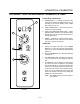
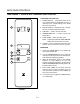
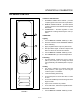
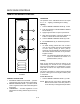
1200 SERIES CONTROL
1
2
3
4
5
6
7
FIGURE 1
COMPONENT DESCRIPTION
1. TIMER - Used to set the desired cook time.
2. THERMOSTAT INDICATOR LIGHT - When lit inĆ
dicates heaters are in operation. When the light
goes out, the oven has reached set operating
temperature.
3. OVEN THERMOSTAT - Controls the oven temĆ
perature at desired settings.
4. UPPER HEATER SWITCH - Controls input to the
upper heater. OFF = no input, LOW = 1/4 input,
MED = 1/2 input, HIGH = full input.
5. LOWER HEATER SWITCH - Controls input to
the lower heater. OFF = no input, LOW = 1/4 inĆ
put, MED = 1/2 input, HIGH = full input.
6. RATING PLATE - Contains electrical rating inforĆ
mation.
7. CIRCUIT BREAKER - Low voltage ovens only
(208 through 240 VAC). Must be in the ON posiĆ
tion for oven operation.
INITIAL STARTUP
1. Set the THERMOSTAT (3) to 300_F (149_C).
2. Turn the UPPER and LOWER HEATER switches
(4 and 5) to HIGH. Allow the oven to run for at
least 2 hours for proper breakĆin.
OPERATION:
1. Set the THERMOSTAT (3) to the desired cooking
temperature.
2. Turn the UPPER and LOWER HEATER switches
(4 and 5) to HIGH.
3. When the oven has reached operating temperaĆ
ture set the heater switches to desired level.
NOTE: With Ultra Rokite decks never put bottom
element on HIGH and top element OFF.
4. Set the TIMER (1) to the desired cook time.