
Programming instructions


OPERATION & CALIBRATION
1-49
OVEN OPERATION
Oven Startup:
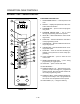
1. Toggle the POWER SWITCH (1) to ON. The disĆ
play gives the software revision level. The oven
preheats to the lowest programmed first stage
temperature. The LEDS (16) for all products with
the same first stage temperature light.
Single Product Cooking Procedure:
NOTE: If the led next to the desired product key is lit
skip step 1.
1. Press the desired PRODUCT KEY (17). The oven
preheats to the first stage temperature for the seĆ
lected product. When the oven reaches 10_ of
the preheat temperature an alarm sounds and the
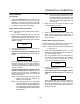
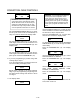
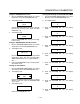
DISPLAY (2) read:
LOAD
2. Load the product into the oven. Press the deĆ
sired PRODUCT KEY (17).
If the shelf timing function is toggled to the on
position for that product key, the DISPLAY (2)
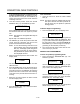
reads:
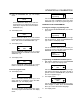
PICK SHLF
Press a SHELF KEY (18) to assign the product to
that shelf and start the cook cycle. Within five
seconds, the DISPLAY (2) scrolls the product
name and shelf number and counts down the reĆ
maining cook time.
If the shelf timing function is toggled to the off
position for that product, pressing the product
key will start the cook cycle. The DISPLAY (2)
scrolls the product name and counts down the
remaining cook time.
NOTE: If the selected product has a cook time of
greater than 59:59 the DISPLAY (2)
switches to hours:minutes.
NOTE: If the selected product is a single stage
recipe the LEDS for all single stage prodĆ
ucts with the same cook temperature and
fan speed will light. If the selected product
is a multiple stage recipe no other product
LEDS will light.
NOTE: Press and hold the selected product key
for three seconds to cancel the cook cycle
for normal operation. To cancel the cook
cycle when using shelf timing, press and
hold the corresponding SHELF KEY (18)
for 3 seconds.
3. When the cook time expires an alarm sounds
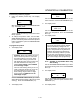
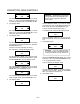
and the DISPLAY (2) reads:
DONE
Product name
4. Press the selected product key to silence the
alarm. Remove the product. If shelf timing is
used, press the flashing SHELF KEY (18) to siĆ
lence the alarm.
Multiple Batch Cooking Procedure:
This procedure is for single stage recipes with the
same cook temperature and fan speed only.
NOTE: If the led next to the first desired product key
is lit skip step 1.
1. Press the first desired PRODUCT KEY (17). The
LEDS for all recipes with the same cook temperaĆ
ture and fan speed will light.
The oven preheats to the cook temperature for
the selected product. When the oven reaches
10_ of the preheat temperature an alarm
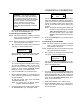
sounds and the DISPLAY (2) reads:
LOAD
2. Load the product into the oven. Press the deĆ
sired PRODUCT KEY (17).
If the shelf timing function is toggled to the on
position for that product key, the DISPLAY (2)
reads
PICK SHLF
Press a SHELF KEY (18) to assign the product to
that shelf and start the cook cycle. Within five
seconds, the DISPLAY (2) scrolls the product
name and shelf number and counts down the reĆ
maining cook time.