
Programming instructions

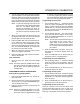

CONVECTION OVEN CONTROLS
1-2
SOLID STATE MANUAL CONTROL
HI
LO
OVEN OFF
COOL
DOWN
COOK
LIGHT OFF
OVEN READY
SOLID STATE
THERMOSTAT
TIMER
ON
OFF
LIGHTS
BLOWER
1
3
4
2
5
6
60 Hz
Only
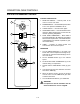
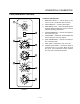
FIGURE 1
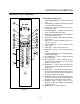
CONTROL DESCRIPTION
1. SELECTOR SWITCH - controls power to the
oven for cook or cool down.
2. BLOWER SWITCH - controls blower speed, either
hi or lo. Two speed not available in 50 Hz.
3. LIGHTS SWITCH - controls interior lights.
4. OVEN READY LIGHT - when lit indicates burner
operation. When the light goes out the oven has
reached operating temperature.
5. SOLID STATE THERMOSTAT - allows either 8
preĆset temperatures to be selected in accordance
with customer requirements, or an infinite selection
of temperatures from 200Ć500_F (95Ć260_C). (infiĆ
nite control shown)
6. TIMER - activates an electric buzzer that
sounds when the cook time expires.
OPERATION
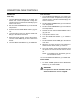
1. Turn the SELECTOR Switch (1) to COOK. The
blower and control compartment cooling fan opĆ
erate and are controlled automatically by the acĆ
tion of the doors.
2. Set the BLOWER Switch (2) to the desired
speed.
3. Set the SOLID STATE THERMOSTAT (5) to the
desired setting or temperature.
4. Preheat until the OVEN READY LIGHT (4) goes
out.
5. Load product into the oven. Determine cook time
and set the TIMER (6).
6. When the buzzer sounds, remove the product
from the oven. Turn the TIMER knob (6) to OFF
to silence the buzzer.
7. Turn the SELECTOR Switch (1) to OVEN OFF.
WARNING!!
A complete five minute shutdown must be
observed before the oven is relighted.